Coach Offline
Role Product Lead · Timeframe 2023
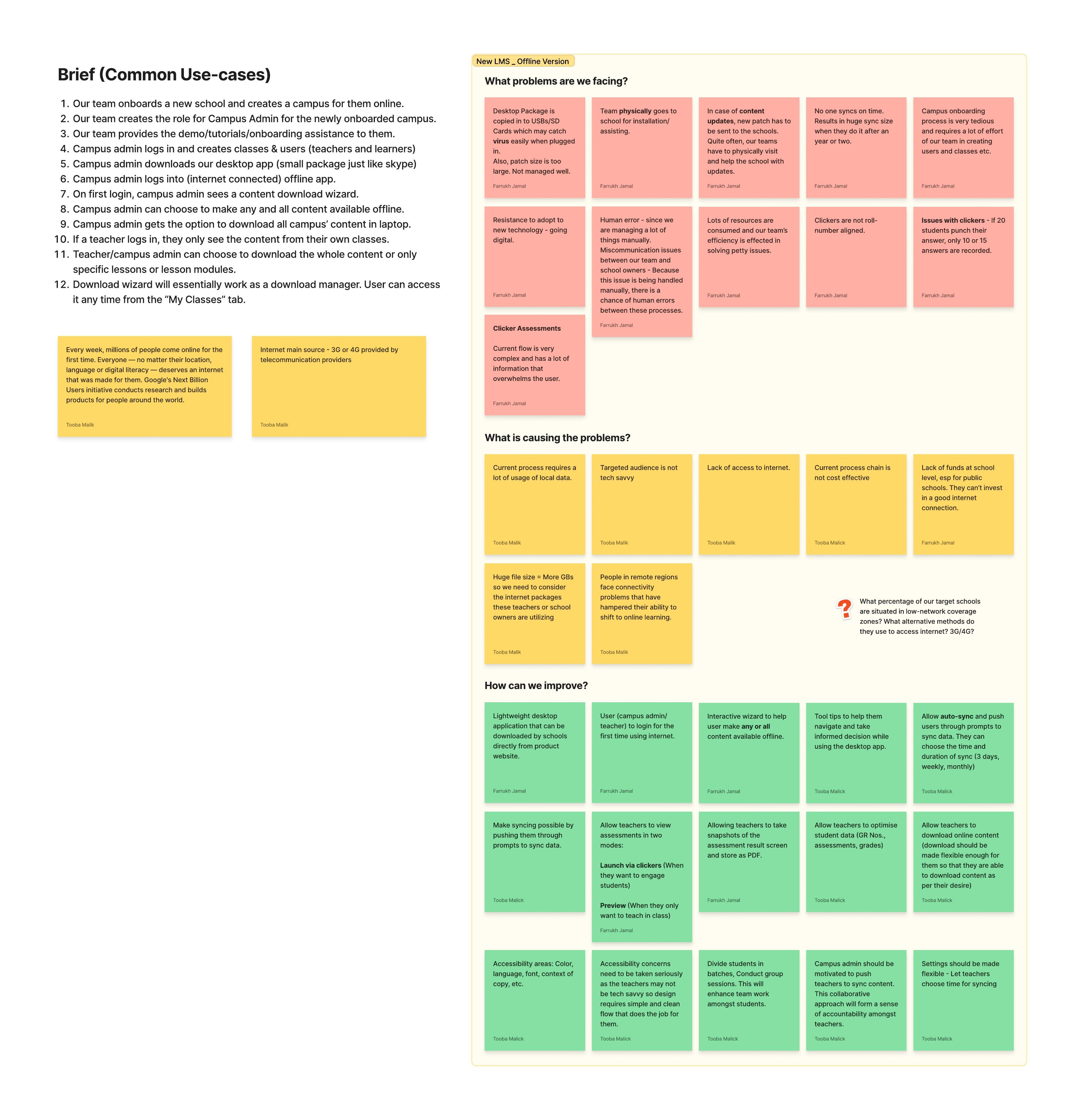
Knowledge Platform's offline LMS was operationally exhausting — USB couriers, virus-infected drives, schools running on year-old data because patch updates required someone to fly out.
I led the rebuild with my design partner Tooba Malik around a single insight: the schools we called offline had WhatsApp-class connectivity. We designed for that — a few-megabyte installer, chunked resumable downloads, a patching utility for multi-laptop schools, and a lightweight server app for school labs.
35 TCF schools deployed in the first wave. Every operational pain point that drove the rebuild was structurally addressed, not bandaged.

Context
Coach Offline is the on-premise deployment of the LMS we’d just rebuilt online. Same product, second front. Designed for schools in Pakistan, the UK, and Afghanistan where reliable internet wasn’t a given — and in many cases, where it didn’t exist at all.
An offline version of the product had existed for years before this work started, but it was heavy, expensive to deploy, and operationally exhausting to maintain. We launched the rebuild shortly after shipping the online redesign because the same architectural simplifications had unlocked something on the offline side: we could now make the product light enough to live on a normal school laptop without dedicated server hardware, and we could reorganize content delivery around the bandwidth our schools actually had instead of the bandwidth they wished they had.
I started and led this work. Tooba Malik joined shortly after kickoff and led design execution alongside me as an integral partner — story-boarding, user-story mapping, user flows, rough iterations, and the final UI screens. I owned product direction, decisions, and the UX and flow design, working directly with engineering and our outreach team.
The Problem
The clearest way to understand the old offline product is to walk through what it actually took to onboard a new school.
Our outreach team would copy the full LMS content — gigabytes — onto a USB stick or SD card. Someone from the team would then travel to the school in person to install it. The school’s laptops, most often shared and well-used, would frequently flash-infect the USB on insertion. The infected stick would have to be discarded, a fresh copy made, another trip planned. When a school had multiple laptops without a dedicated server, each one needed its own install. When content was updated — every few months, sometimes more — a new patch had to be generated, the same size as the original content, and physically delivered again.
The result was an operating model that scaled linearly with school count and content velocity. Every new school added a fixed cost to onboarding. Every content update added a fixed cost per school. And because nobody actually wanted to ship USBs across cities every quarter, schools went long stretches without updates — a year or more was common. Stakeholders looking at the principal dashboard were sometimes seeing data twelve months stale. A student would have one performance profile on the offline product and a different one on the online product because the accounts weren’t reconciled.
“It used to take days. Sometimes we’d get to a school, find the system had a virus, and have to leave and come back. For a school with five laptops, we’d be there a week.” — Member, outreach team
The classroom side had its own version of the same problem. The product supported clickers — small handheld response devices for in-class assessments. The clicker assignment screen was a free-text grid: the teacher typed each student’s name and the physical clicker number they’d handed that student. If a clicker stopped working mid-class, the teacher had to re-do the assignment. If a student was absent, the order broke. If three students in a class had the same name — a Farrukh Jamal problem we ran into more often than you’d think — there was no reliable way to tell whose responses were whose, because the pairing rode on whatever the teacher had typed in. Teachers were burning around fifteen minutes per class just on clicker setup.
We had a working product. It just wasn’t a product that could scale.
The Reframe
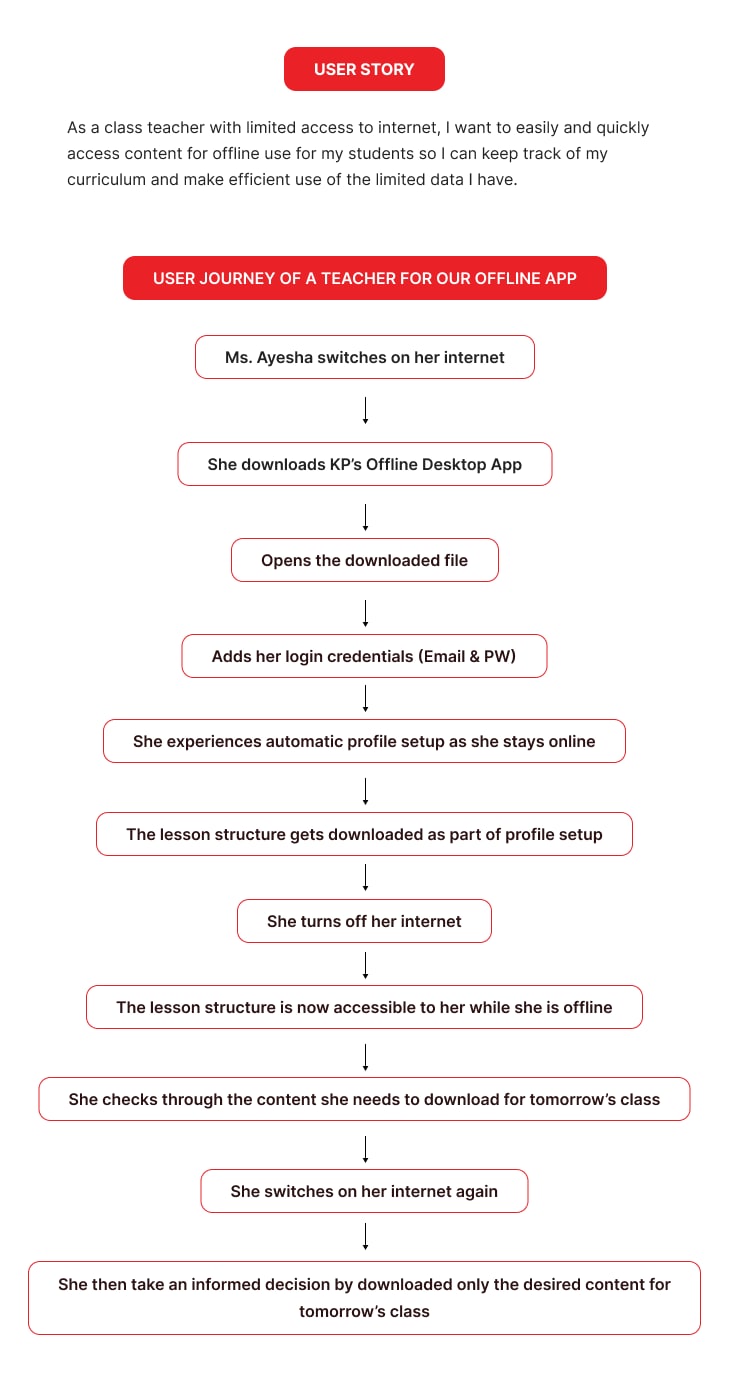
The insight that changed the design constraint came out of field observation. Schools we’d assumed were “offline” weren’t actually offline — they had enough connectivity to run WhatsApp. Not enough to stream video, not enough to run a real-time application, but enough to move small files at a slow pace.
That set the floor. We weren’t designing for no internet. We were designing for WhatsApp internet — and that’s a very different design problem. If we could get the app itself small enough, and the content payloads chunked into resumable pieces, we could push updates over the same connection schools already had.
The second insight came from observing what teachers actually did with the product in class. The most-used module wasn’t video. It wasn’t games. It was assessments — short MCQ-style activities teachers ran via clickers at the end of a lesson. And assessments are by far the lightest content type. Once we knew assessments were the priority unit, the download experience could be redesigned to prioritize them: download all the assessments first, fast, and let videos and games trail behind.
These two insights — design against the bandwidth they actually have and prioritize the smallest, most-used content type — drove almost every product decision that followed.
The Solution
We restructured the offline product into three components, each addressing a distinct user scenario.

Component 1 — A lightweight desktop app
A few-megabyte installer, downloadable directly from our product website. No third-party software requirements, no IT setup, no truck roll. The Campus Admin at each school — a person the school appoints, not a member of our team — runs through a one-time setup that requires internet only at first login.
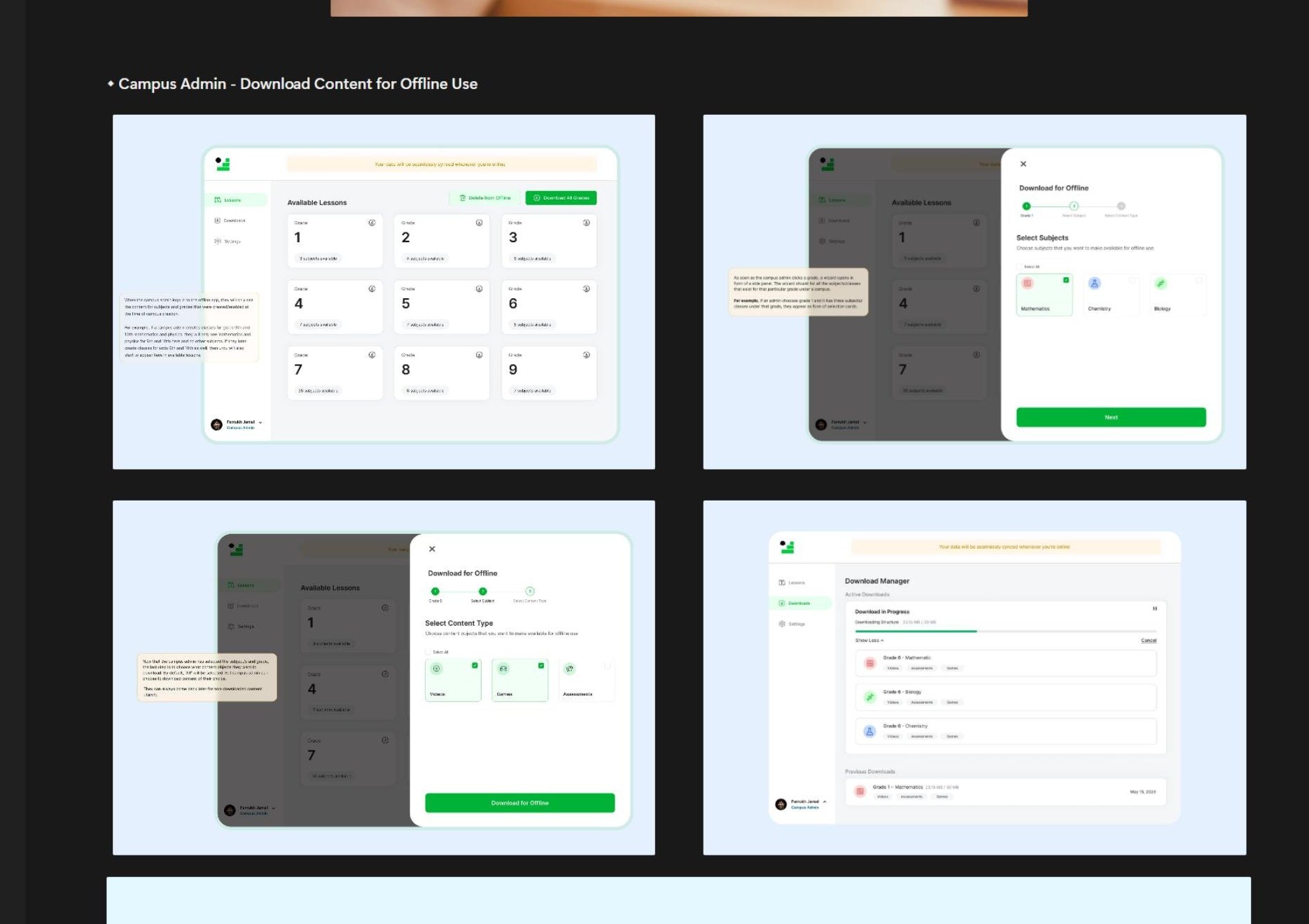
After login, the admin sees a content-download wizard built like a configurable funnel: pick a grade, pick subjects within that grade (all or some), pick lessons within those subjects (all or some), pick content types within those lessons (assessments only, or videos only, or all of them). For schools with patchy internet, this is the key surface — they can grab just the assessments for the grades they actually teach and have a working classroom experience inside an hour, instead of waiting for the full payload.
Downloads are chunked and resumable. If the connection drops at 60%, the next session picks up at 60%. The app auto-syncs whenever the laptop sees an internet connection. And we built in a contract that turned out to be the boldest call of the project: sync at least once a month, or the app locks out. No exceptions, no per-school negotiation. If you want to keep using the product, the data has to stay current.
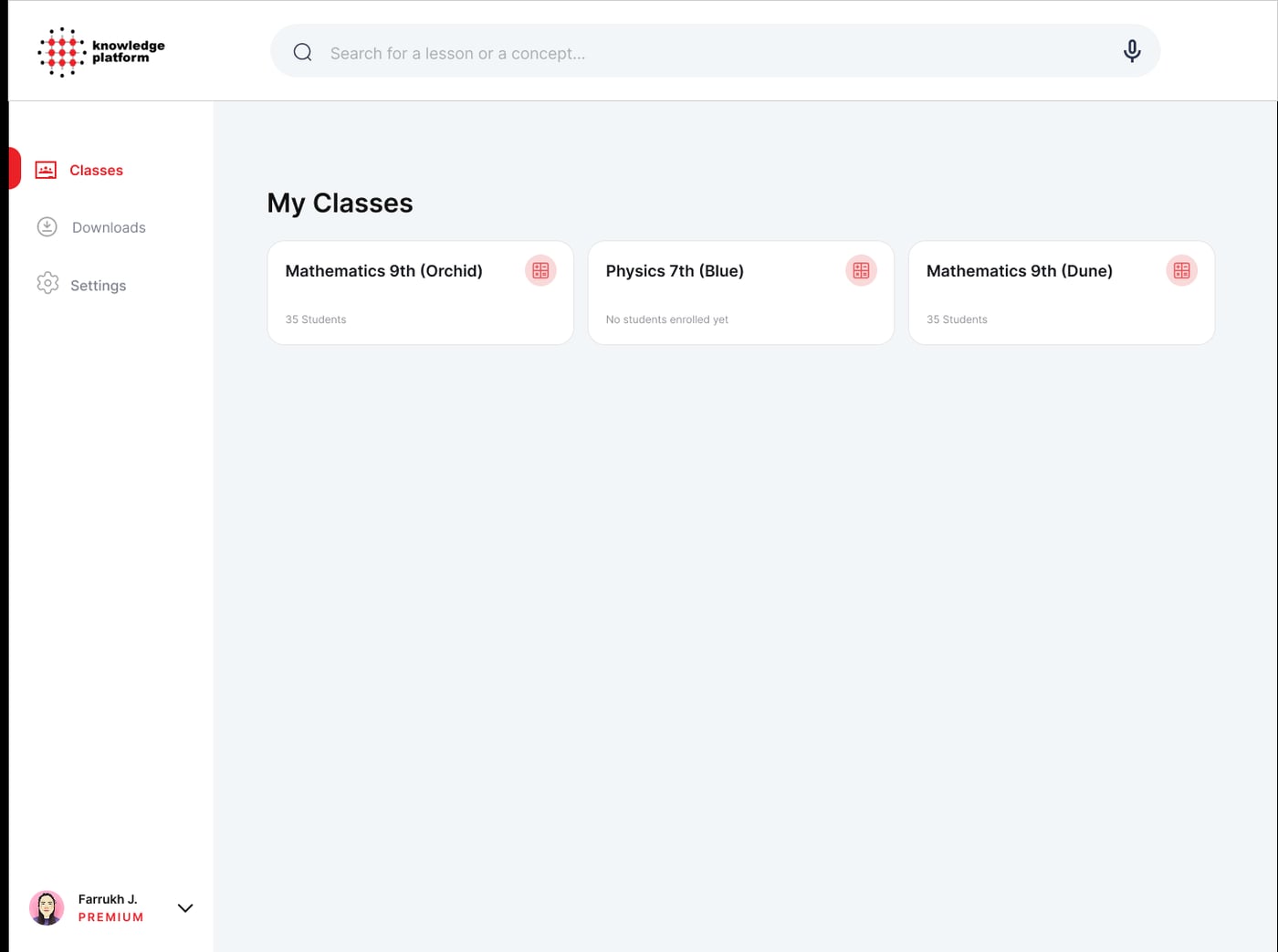
Teachers using the same app see only their own classes and the content their admin has downloaded. They can deliver lessons offline, run clicker assessments, and pull up performance dashboards — all without an internet connection. The dashboards on the teacher side became the first place principals and outreach team members could see real data instead of year-old snapshots.
Component 2 — A patching utility for multi-laptop schools
The single biggest operational waste in the old model was downloading content multiple times in the same building. A school with five laptops meant five downloads of the same content, even when all five sat on the same desk.
We built a small utility that ships with the desktop app on every machine. Download content once on any one laptop — the Campus Admin’s, usually. Run the patching utility on that laptop, and it generates a single encrypted, compressed patch file containing everything that’s been downloaded. Walk that patch to the next laptop on a USB stick. The utility on the target laptop extracts it, decrypts it, and makes the content available inside the app.
The patch is significantly smaller than the original content (zipped). It’s encrypted and only readable inside our app, which means the content never exists in the clear on a USB the way the old install media did. And it never touches the internet a second time. The first time we tested it at a school with multiple laptops, what had been a full-day install became something the school could do themselves in an afternoon.
Component 3 — A lightweight server app for school labs
Some schools — particularly TCF-network schools in remote areas — had a different scenario. They didn’t just want offline access for the Campus Admin and a handful of teachers. They wanted learners to be able to walk into a computer lab and access the content from any of the lab’s machines for independent study.
The old version of this required a heavy server-class machine the school had to purchase, plus an IT team to maintain it. Many of our target schools couldn’t afford either. So we built a third surface: a lightweight server app that any laptop in the school can host. Other devices on the local network connect through it via LAN. Setup is something a school’s IT admin — often a generalist teacher with some technical confidence — can do themselves, without our team on-site.
This is the deployment that took us into schools we couldn’t previously reach.
A fourth thing we fixed along the way — the clicker assignment problem
Once we were rebuilding the classroom flow anyway, we tackled the clicker assignment chaos. The fix was structural, not cosmetic.
The new assignment screen opens by connecting to the clicker base station and detecting which physical clickers are present and responding. The teacher then assigns that specific clicker — by hardware ID — to that specific learner, by their unique system username. Free-text name typing is gone. The system holds the pairing.
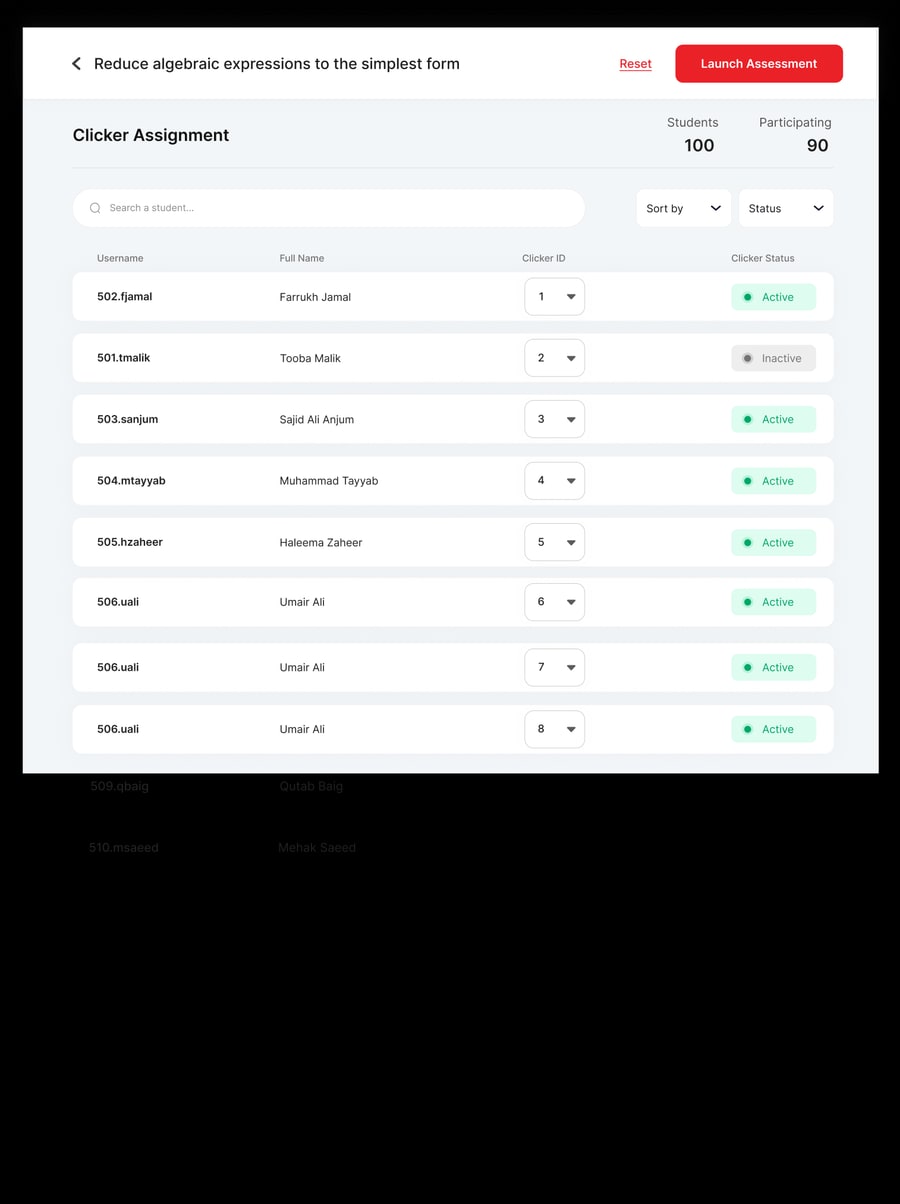
Once the assignment is set, it persists. Same student, different classes — the system tracks them correctly across all of them. Same physical clicker, different students in different classes — also tracked correctly, because the pairing knows whose username it’s logging responses for at any given moment. If a clicker stops working, the screen shows it as offline and the teacher reassigns just that learner. If a student is absent, the order doesn’t break.
We also rebuilt the assessment experience around the live in-class moment. As students respond via clickers, the per-student response grid updates in real time — teachers can spot misconceptions forming during the lesson, not after it. The post-assessment view layers on a class-level skill-based performance breakdown, a per-question correctness chart, a per-student row by unique username, and a downloadable PDF for paper-based distribution and parent meetings.
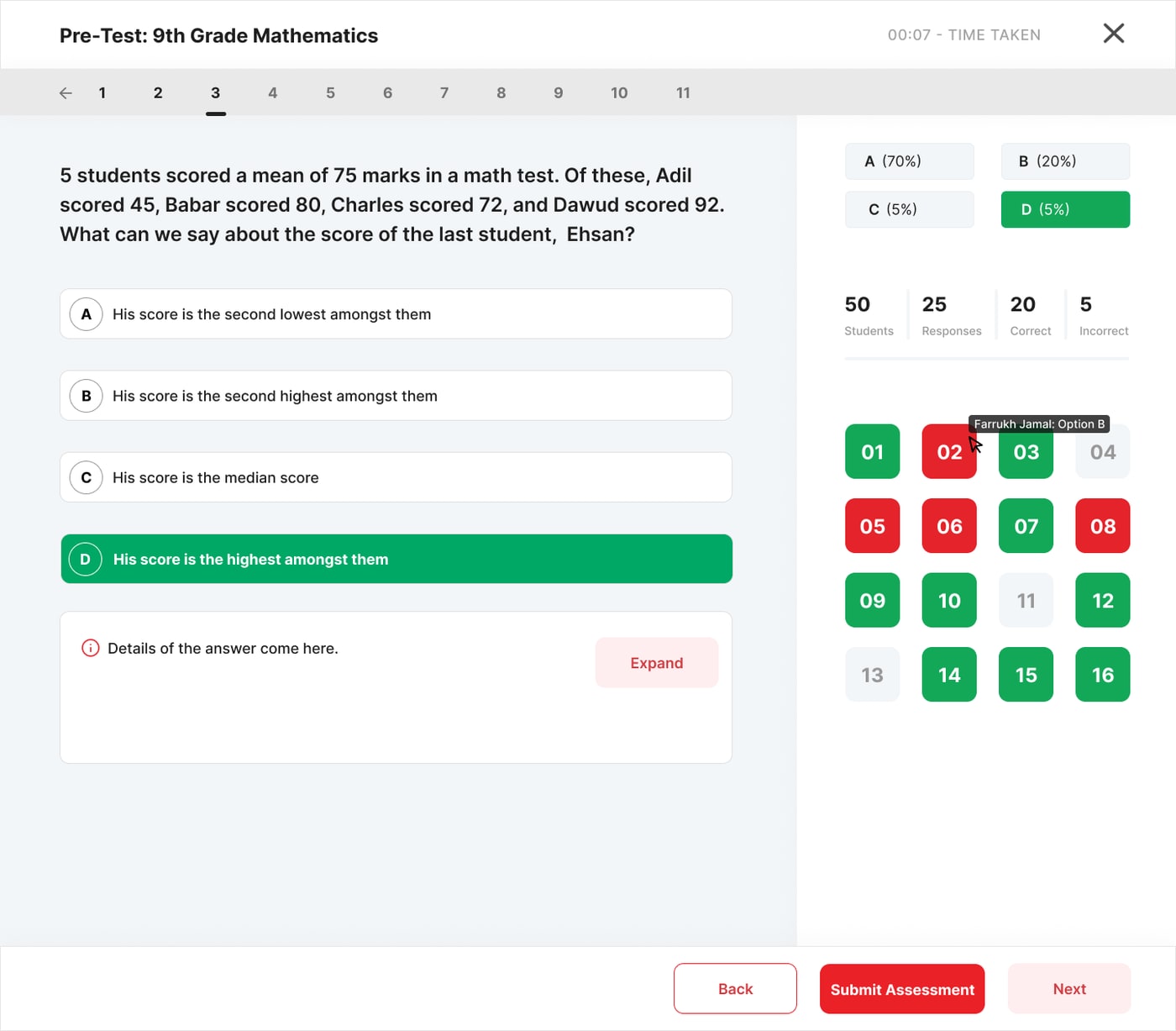
The teachers we’d been watching lose fifteen minutes per class on clicker setup were getting that time back.
Key Decisions
Five decisions shaped this work.
1. Sync monthly or lock out
The boldest call. Forcing a sync cadence into the product contract — rather than asking schools to remember, or trying to chase them — was the only way to escape the year-old-data problem at the root. There was very little internal resistance to this one, because the pain of stale data had been felt by everyone in the company: outreach teams getting blindsided in school meetings, principals looking at numbers that didn’t match what was happening in their building, our analytics team unable to answer basic questions.
2. Designed against the bandwidth schools actually had
WhatsApp-class connectivity was the floor. Every design decision downstream — the few-MB installer, the chunked resumable downloads, the content-type prioritization, the patching utility — followed from that single framing.
3. Assessments first in the download wizard
A research-led prioritization. The most-used classroom module is also the lightest payload. Letting schools grab the smallest, most-valuable content type first meant they could have a working classroom experience long before the full download finished.
4. Removed the server hardware requirement
The old offline product made schools buy dedicated server-class machines. The new model treats any laptop as a viable host. For schools running on tight budgets, this was the difference between being able to deploy the product and not.
5. Replaced teacher-maintained pairings with a system-verified hardware handshake
The clicker fix is small in surface area but a useful principle in general: when the system can know something directly, don’t ask the user to maintain it for the system. Free-text name fields are a smell. A hardware handshake is a fix.
Outcome
The MVP launched in 2023.
The most concrete pilot result is 35 TCF schools that deployed the new offline product in their first wave — a network of schools serving remote and under-resourced communities in Pakistan, which had been hard to reach under the old deployment model and which the lightweight-server-app component was specifically designed for.
Existing schools that had been running the old offline product reported the new version as a meaningful operational simplification — lighter to install, easier to maintain, no more truck rolls for routine content updates. Our outreach team observed a clear drop in support-ticket volume relative to the old offline deployment, though the precise delta is still being pulled from records held by our outreach team and isn’t yet a number I can publish.
Designed-for target on the original brief: roughly 70% reduction in operational costs of running the offline deployment at scale, driven by removing physical truck rolls for setup and updates, eliminating the per-laptop install model, and pushing routine maintenance to a self-serve Campus Admin role. This was the goal we designed against; the measured delta is still being collected and isn’t reported here.
What I can say with confidence: every single operational pain point that drove the rebuild — USB virus loops, multi-week onboarding, year-old dashboard data, GB-scale patch shipments, clicker setup chaos — was structurally addressed in the new architecture, not just bandaged.
Reflection
Three principles I carry forward from this work.
- Design for the bandwidth your users already have, not the bandwidth you wish they had. WhatsApp-class connectivity wasn’t a limitation we apologized for; it was the design constraint we built around. Once you accept the real environment, the design opens up rather than closes down.
- In low-connectivity contexts, the network isn’t the only constraint. Physical security (USB viruses), operational cost (truck rolls), behavioral habit (teachers’ resistance to new tooling), and budget reality (no server-class hardware) all shape what’s actually deployable. A solution that only solves bandwidth misses three-quarters of the actual problem.
- When you can move work out of the user’s hands into the system’s, do. Replacing the teacher-typed clicker pairing with a hardware handshake is the smallest example. The Campus Admin role is the largest — the school took over a job our team used to do, because we made the job small enough to take over. The same principle scaled across the whole rebuild.
The offline product wasn’t a feature on the side of the online product. It was a parallel surface, with its own users, constraints, and operating model — and the work it took to make it credible reshaped how I think about products that have to ship into the world as it actually is.
Role: Product Lead — led product direction, decisions, and UX/flow design, working with engineering, outreach, and partner schools • Co-led design execution with Tooba Malik (Product Designer), who story-boarded, mapped user stories, designed flows, iterated, and built the final UI screens • Launched: MVP in 2023 • Markets: Pakistan (incl. TCF network), Afghanistan, UK • Companion case study to the LMS flagship redesign